

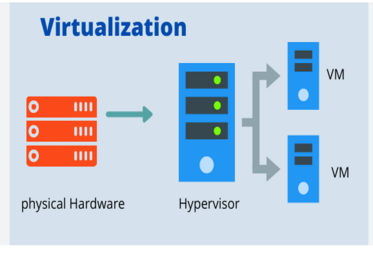
Virtualization is a process that allows for more efficient use of physical computer hardware and is the foundation of cloud computing.
Virtualization uses software to create an abstraction layer over computer hardware, enabling the division of a single computer's hardware components—such as processors, memory and storage—into multiple virtual machines (VMs). Each VM runs its own operating system (OS) and behaves like an independent computer, even though it is running on just a portion of the actual underlying computer hardware.
Benefits of virtualization :
- Resource efficiency
- Easier management
- Minimal downtime
- Faster provisioning
Before virtualization, IT staff would allocate a dedicated physical CPU to each application server, buying and setting up a separate server for every application. This approach, favoring one application and one operating system per computer, was adopted for its reliability. Invariably, each physical server would be underused. In contrast, server virtualization enables you to run several applications—each on its own VM with its own OS—on a single physical computer (typically an x86 server) without sacrificing reliability. This enables maximum use of the physical hardware’s computing capacity.
Replacing physical computers with software-defined VMs makes it easier to use and manage policies written in software. This allows you to create automated IT service management workflows. For example, automated deployment and configuration tools enable administrators to define collections of virtual machines and applications as services, in software templates. This means that they can install those services repeatedly and consistently without cumbersome, time-consuming and error-prone manual setup. Admins can use virtualization security policies to mandate certain security configurations based on the role of the virtual machine. Policies can even increase resource efficiency by retiring unused virtual machines to save on space and computing power.
OS and application crashes can cause downtime and disrupt user productivity. Admins can run multiple redundant virtual machines alongside each other and failover between them when problems arise. Running multiple redundant physical servers is more expensive.
Buying, installing and configuring hardware for each application is time-consuming. If the hardware is already in place, provisioning virtual machines to run all your applications is significantly faster. You can even automate it using management software and build it into existing workflows.
Virtual machines:
Virtual machines are virtual environments that simulate a physical computer in software form. They normally comprise several files containing the VM’s configuration, the storage for the virtual hard drive, and some snapshots of the VM that preserve its state at a particular point in time.
Hypervisor
- Type 1 hypervisors
- Type 2 hypervisors
A hypervisor is the software layer that coordinates VMs. It serves as an interface between the VM and the underlying physical hardware, ensuring that each has access to the physical resources it needs to execute. It also ensures that the VMs don’t interfere with each other by impinging on each other’s memory space or compute cycles.
There are two types of hypervisors:Type 1 or “bare-metal” hypervisors interact with the underlying physical resources, replacing the traditional operating system altogether. They most commonly appear in virtual server scenarios.
Type 2 hypervisors run as an application on an existing OS. Most commonly used on endpoint devices to run alternative operating systems, they carry a performance overhead because they must use the host OS to access and coordinate the underlying hardware resources.



Leave a comment